---
metadata:
  - name: generator
    content: Diplodoc Platform v5.63.0
alternate:
  - en/reports/
  - ru/reports/
  - href: en/reports/index.md
    type: text/markdown
    title: Markdown version
csp:
  - script-src:
      - https://mc.yandex.ru
    img-src:
      - https://mc.yandex.ru
    connect-src:
      - https://mc.yandex.ru
      - wss://mc.yandex.ru
    child-src:
      - 'blob:'
      - https://mc.yandex.ru
    frame-src:
      - 'blob:'
      - https://mc.yandex.ru
    frame-ancestors:
      - 'blob:'
      - https://mc.yandex.ru
canonical: en/reports/index.html
title: Reports in DataLens On-premises
description: >-
  In this tutorial, you will learn about reports in DataLens On-premises and
  discover some features of report widgets.
vcsPath: en/reports/index.md
---

# Reports in DataLens

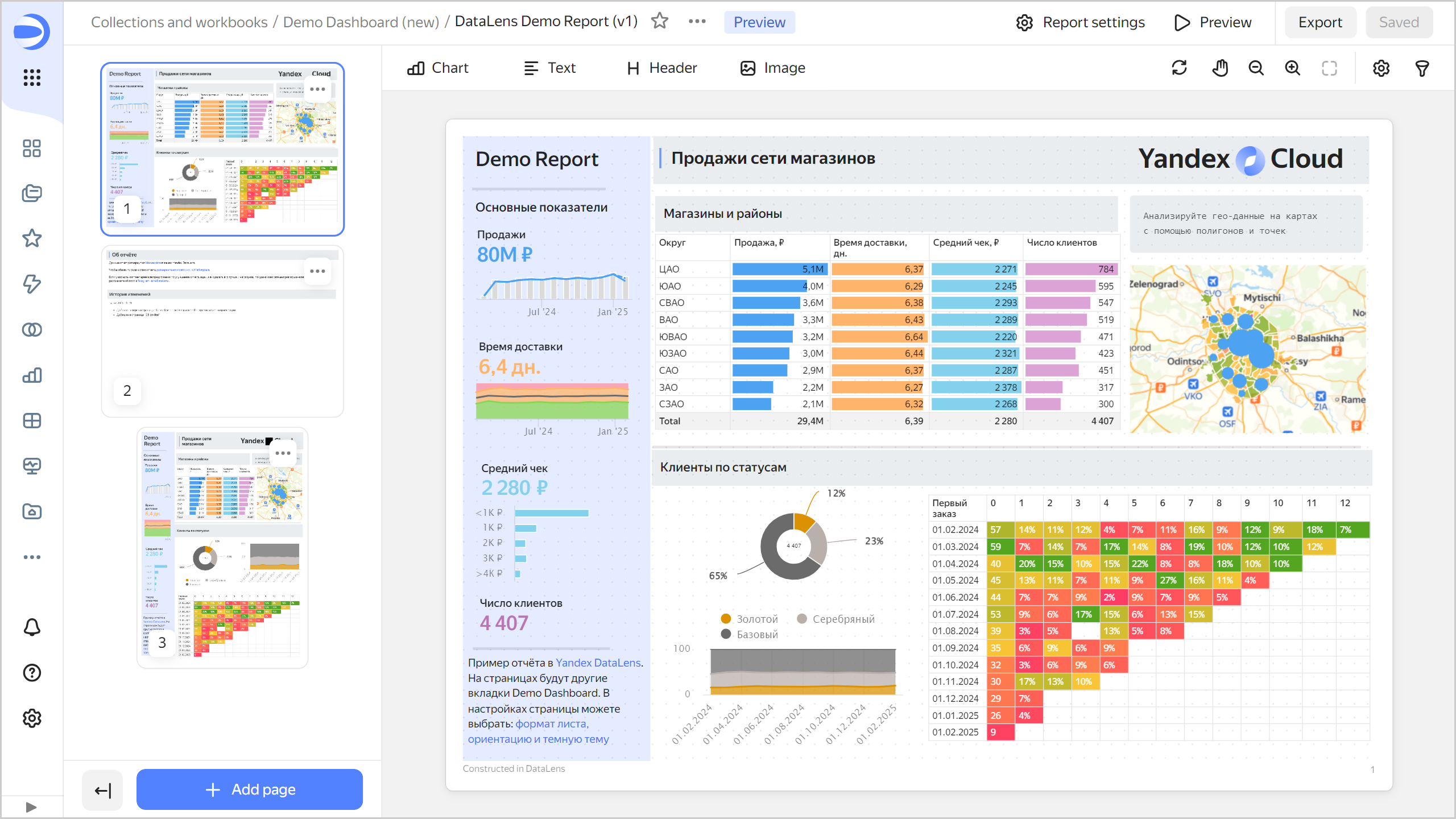
A _report_ is a multi-page document in a specified format you can use as an interactive presentation or export to PDF and print. You can add [charts](../concepts/chart/index.md), [text blocks](../dashboard/widget.md#text), [headers](../dashboard/widget.md#title), and images to the pages of the report.


To view the report example, download the demo dashboard export JSON file from the Gallery and import it into your DataLens On-premises:

1. Go to the [DataLens Demo Dashboard](https://datalens.ru/gallery/wcyljs3cf5mwi) page.
1. Click **Use** → **Download**. The workbook will be downloaded as a JSON file.
   Import the workbook using [this guide](../workbooks-collections/export-and-import.md#import-workbook).


Join [our Telegram community](https://t.me/YandexDataLens/113821/117093) to explore more reports.
![report-page](../_assets/datalens/report/demo_report.png)

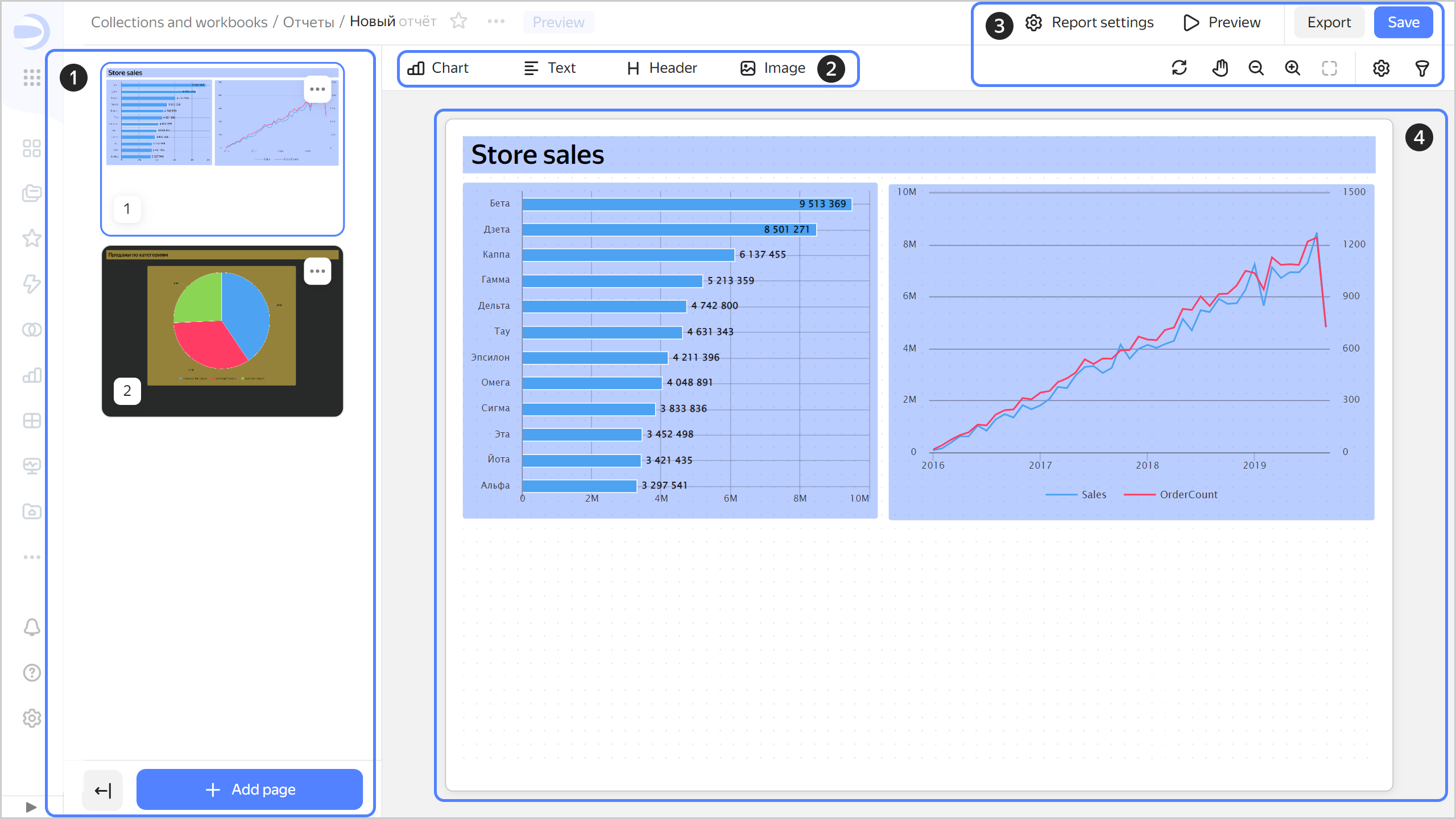
The report builder has these structural elements:

1. Report page preview area. Here you can manage the report pages: [add, move, or delete them](./report-operations.md#report-pages). To collapse the preview area, click <!-- diplodoc:svg ![image](../_assets/console-icons/arrow-left-from-line.svg) --><svg xmlns="http://www.w3.org/2000/svg" width="16" height="16" fill="none" viewBox="0 0 16 16"><path fill="currentColor" fill-rule="evenodd" d="M1.22 8.53a.75.75 0 0 1 0-1.06l2.5-2.5a.75.75 0 0 1 1.06 1.06L3.56 7.25h7.69a.75.75 0 0 1 0 1.5H3.56l1.22 1.22a.75.75 0 1 1-1.06 1.06zm12.28 5.72a.75.75 0 0 0 1.5 0V1.75a.75.75 0 0 0-1.5 0z" clip-rule="evenodd"/></svg>. Instead of pages, their sequence numbers will be displayed. Click <!-- diplodoc:svg ![image](../_assets/console-icons/arrow-right-to-line.svg) --><svg xmlns="http://www.w3.org/2000/svg" width="16" height="16" fill="none" viewBox="0 0 16 16"><path fill="currentColor" fill-rule="evenodd" d="M11.78 7.47a.75.75 0 0 1 0 1.06l-2.5 2.5a.75.75 0 1 1-1.06-1.06l1.22-1.22H1.75a.75.75 0 0 1 0-1.5h7.69L8.22 6.03a.75.75 0 0 1 1.06-1.06zm1.72 6.78a.75.75 0 0 0 1.5 0V1.75a.75.75 0 0 0-1.5 0z" clip-rule="evenodd"/></svg> to expand the preview area and display the pages.
1. Panel for [adding widgets](./report-operations.md#add-widget) to the report.
1. Basic controls:

   * <!-- diplodoc:svg ![icon](../_assets/console-icons/gear.svg) --><svg xmlns="http://www.w3.org/2000/svg" width="16" height="16" fill="none" viewBox="0 0 16 16"><path fill="currentColor" fill-rule="evenodd" d="M7.199 2H8.8a.2.2 0 0 1 .2.2c0 1.808 1.958 2.939 3.524 2.034a.2.2 0 0 1 .271.073l.802 1.388a.2.2 0 0 1-.073.272c-1.566.904-1.566 3.164 0 4.069a.2.2 0 0 1 .073.271l-.802 1.388a.2.2 0 0 1-.271.073C10.958 10.863 9 11.993 9 13.8a.2.2 0 0 1-.199.2H7.2a.2.2 0 0 1-.2-.2c0-1.808-1.958-2.938-3.524-2.034a.2.2 0 0 1-.272-.073l-.8-1.388a.2.2 0 0 1 .072-.271c1.566-.905 1.566-3.165 0-4.07a.2.2 0 0 1-.073-.27l.801-1.389a.2.2 0 0 1 .272-.072C5.042 5.138 7 4.007 7 2.199c0-.11.089-.199.199-.199M5.5 2.2c0-.94.76-1.7 1.699-1.7H8.8c.94 0 1.7.76 1.7 1.7a.85.85 0 0 0 1.274.735 1.7 1.7 0 0 1 2.32.622l.802 1.388c.469.813.19 1.851-.622 2.32a.85.85 0 0 0 0 1.472 1.7 1.7 0 0 1 .622 2.32l-.802 1.388a1.7 1.7 0 0 1-2.32.622.85.85 0 0 0-1.274.735c0 .939-.76 1.7-1.699 1.7H7.2a1.7 1.7 0 0 1-1.699-1.7.85.85 0 0 0-1.274-.735 1.7 1.7 0 0 1-2.32-.622l-.802-1.388a1.7 1.7 0 0 1 .622-2.32.85.85 0 0 0 0-1.471 1.7 1.7 0 0 1-.622-2.32l.801-1.389a1.7 1.7 0 0 1 2.32-.622A.85.85 0 0 0 5.5 2.2m4 5.8a1.5 1.5 0 1 1-3 0 1.5 1.5 0 0 1 3 0M11 8a3 3 0 1 1-6 0 3 3 0 0 1 6 0" clip-rule="evenodd"/></svg> **Report settings**: Opens the [report settings](./report-operations.md#report-settings) window.
   * <!-- diplodoc:svg ![icon](../_assets/console-icons/play.svg) --><svg xmlns="http://www.w3.org/2000/svg" width="16" height="16" fill="none" viewBox="0 0 16 16"><g clip-path="url(#svg-3140afun__a)"><path fill="currentColor" fill-rule="evenodd" d="M14.006 7.134 5.5 2.217a1 1 0 0 0-1.5.866v9.834a1 1 0 0 0 1.5.866l8.506-4.917a1 1 0 0 0 0-1.732m.75 3.03c1.665-.962 1.665-3.366 0-4.329L6.251.918C4.585-.045 2.5 1.158 2.5 3.083v9.834c0 1.925 2.085 3.128 3.751 2.164z" clip-rule="evenodd"/></g><defs><clipPath id="svg-3140afun__a"><path fill="currentColor" d="M0 0h16v16H0z"/></clipPath></defs></svg> **Preview**: Opens a full-screen view of the report as document or presentation.
   * **Export**: Exports the report in `.pdf`.
   * **Save**: Saves the report.
   * <!-- diplodoc:svg ![icon](../_assets/console-icons/arrows-rotate-right.svg) --><svg xmlns="http://www.w3.org/2000/svg" width="16" height="16" fill="none" viewBox="0 0 16 16"><path fill="currentColor" fill-rule="evenodd" d="M8 1.5a6.5 6.5 0 0 0-6.445 5.649.75.75 0 1 0 1.488.194A5.001 5.001 0 0 1 11.57 4.5h-1.32a.75.75 0 0 0 0 1.5h3a.75.75 0 0 0 .75-.75v-3a.75.75 0 0 0-1.5 0v1.06A6.48 6.48 0 0 0 8 1.5m-5.25 13a.75.75 0 0 1-.75-.75v-3a.75.75 0 0 1 .75-.75h3a.75.75 0 0 1 0 1.5H4.43a5.001 5.001 0 0 0 8.528-2.843.75.75 0 1 1 1.487.194A6.501 6.501 0 0 1 3.5 12.691v1.059a.75.75 0 0 1-.75.75" clip-rule="evenodd"/></svg>: Refreshes the report charts with applied parameters on the current page only.
   * <!-- diplodoc:svg ![icon](../_assets/console-icons/hand-stop.svg) --><svg xmlns="http://www.w3.org/2000/svg" width="16" height="16" fill="none" viewBox="0 0 16 16"><path fill="currentColor" fill-rule="evenodd" d="M4.618 8.405 3.47 8.118a1.988 1.988 0 0 0-1.8 3.417l2.198 1.946a7.9 7.9 0 0 0 6.14 1.932A5.34 5.34 0 0 0 14.72 9.71l-.437-5.83a2.033 2.033 0 0 0-2.511-1.822l-.005-.113a2.02 2.02 0 0 0-3.866-.739A2.04 2.04 0 0 0 4.97 2.91zm1.673-2.64.126-1.968.045-.707.006-.084a.54.54 0 0 1 1.077-.015l.007.084.064.706.032.346.147 1.618.201 2.216L8 8h1l.004-.091.146-3.822.049-1.256.03-.792.002-.04A.52.52 0 0 1 10.268 2l.002.04.03.792.02.576.02.524.153 4.125.002.063.003.077.002.053h1l.002-.037.04-.762.139-2.64.039-.738.003-.068a.53.53 0 0 1 .533-.505c.278 0 .51.215.531.493l.005.068.055.737.198 2.636.18 2.388a3.84 3.84 0 0 1-3.389 4.1 6.4 6.4 0 0 1-4.974-1.565l-1.259-1.114L3.328 11l-.473-.42-.19-.168a.488.488 0 0 1 .442-.84l.246.062.613.154.357.089.198.05 1.479.37.098-1.523z" clip-rule="evenodd"/></svg>: Moves the report page around the screen. When clicked again, returns you to move widget mode.
   * <!-- diplodoc:svg ![icon](../_assets/console-icons/magnifier-minus.svg) --><svg xmlns="http://www.w3.org/2000/svg" width="16" height="16" fill="none" viewBox="0 0 16 16"><path fill="currentColor" fill-rule="evenodd" d="M6.75 11a4.25 4.25 0 1 0 0-8.5 4.25 4.25 0 0 0 0 8.5m0 1.5a5.73 5.73 0 0 0 3.501-1.188l2.719 2.718a.75.75 0 1 0 1.06-1.06l-2.718-2.719A5.75 5.75 0 1 0 6.75 12.5m-2-6.5a.75.75 0 0 0 0 1.5h4a.75.75 0 0 0 0-1.5z" clip-rule="evenodd"/></svg>: Zooms out on the report.
   * <!-- diplodoc:svg ![icon](../_assets/console-icons/magnifier-plus.svg) --><svg xmlns="http://www.w3.org/2000/svg" width="16" height="16" fill="none" viewBox="0 0 16 16"><path fill="currentColor" fill-rule="evenodd" d="M6.75 11a4.25 4.25 0 1 0 0-8.5 4.25 4.25 0 0 0 0 8.5m0 1.5a5.73 5.73 0 0 0 3.501-1.188l2.719 2.718a.75.75 0 1 0 1.06-1.06l-2.718-2.719A5.75 5.75 0 1 0 6.75 12.5m.75-7.75a.75.75 0 0 0-1.5 0V6H4.75a.75.75 0 0 0 0 1.5H6v1.25a.75.75 0 0 0 1.5 0V7.5h1.25a.75.75 0 0 0 0-1.5H7.5z" clip-rule="evenodd"/></svg>: Zooms in on the report.
   * <!-- diplodoc:svg ![icon](../_assets/console-icons/square-dashed.svg) --><svg xmlns="http://www.w3.org/2000/svg" width="16" height="16" fill="none" viewBox="0 0 16 16"><path fill="currentColor" fill-rule="evenodd" d="M4.5 3A1.5 1.5 0 0 0 3 4.5v1.75a.75.75 0 0 1-1.5 0V4.5a3 3 0 0 1 3-3h1.75a.75.75 0 0 1 0 1.5zM9 2.25a.75.75 0 0 1 .75-.75h1.75a3 3 0 0 1 3 3v1.75a.75.75 0 0 1-1.5 0V4.5A1.5 1.5 0 0 0 11.5 3H9.75A.75.75 0 0 1 9 2.25M2.25 9a.75.75 0 0 1 .75.75v1.75A1.5 1.5 0 0 0 4.5 13h1.75a.75.75 0 0 1 0 1.5H4.5a3 3 0 0 1-3-3V9.75A.75.75 0 0 1 2.25 9m11.5 0a.75.75 0 0 1 .75.75v1.75a3 3 0 0 1-3 3H9.75a.75.75 0 0 1 0-1.5h1.75a1.5 1.5 0 0 0 1.5-1.5V9.75a.75.75 0 0 1 .75-.75" clip-rule="evenodd"/></svg>: Resets the report display scale and centers it on the screen.
   * <!-- diplodoc:svg ![icon](../_assets/console-icons/gear.svg) --><svg xmlns="http://www.w3.org/2000/svg" width="16" height="16" fill="none" viewBox="0 0 16 16"><path fill="currentColor" fill-rule="evenodd" d="M7.199 2H8.8a.2.2 0 0 1 .2.2c0 1.808 1.958 2.939 3.524 2.034a.2.2 0 0 1 .271.073l.802 1.388a.2.2 0 0 1-.073.272c-1.566.904-1.566 3.164 0 4.069a.2.2 0 0 1 .073.271l-.802 1.388a.2.2 0 0 1-.271.073C10.958 10.863 9 11.993 9 13.8a.2.2 0 0 1-.199.2H7.2a.2.2 0 0 1-.2-.2c0-1.808-1.958-2.938-3.524-2.034a.2.2 0 0 1-.272-.073l-.8-1.388a.2.2 0 0 1 .072-.271c1.566-.905 1.566-3.165 0-4.07a.2.2 0 0 1-.073-.27l.801-1.389a.2.2 0 0 1 .272-.072C5.042 5.138 7 4.007 7 2.199c0-.11.089-.199.199-.199M5.5 2.2c0-.94.76-1.7 1.699-1.7H8.8c.94 0 1.7.76 1.7 1.7a.85.85 0 0 0 1.274.735 1.7 1.7 0 0 1 2.32.622l.802 1.388c.469.813.19 1.851-.622 2.32a.85.85 0 0 0 0 1.472 1.7 1.7 0 0 1 .622 2.32l-.802 1.388a1.7 1.7 0 0 1-2.32.622.85.85 0 0 0-1.274.735c0 .939-.76 1.7-1.699 1.7H7.2a1.7 1.7 0 0 1-1.699-1.7.85.85 0 0 0-1.274-.735 1.7 1.7 0 0 1-2.32-.622l-.802-1.388a1.7 1.7 0 0 1 .622-2.32.85.85 0 0 0 0-1.471 1.7 1.7 0 0 1-.622-2.32l.801-1.389a1.7 1.7 0 0 1 2.32-.622A.85.85 0 0 0 5.5 2.2m4 5.8a1.5 1.5 0 1 1-3 0 1.5 1.5 0 0 1 3 0M11 8a3 3 0 1 1-6 0 3 3 0 0 1 6 0" clip-rule="evenodd"/></svg>: Opens the [current page settings](./report-operations.md#page-settings) window.
   * <!-- diplodoc:svg ![icon](../_assets/console-icons/funnel.svg) --><svg xmlns="http://www.w3.org/2000/svg" width="16" height="16" fill="none" viewBox="0 0 16 16"><path fill="currentColor" fill-rule="evenodd" d="M12.5 4c0 .174-.071.513-.885.888S9.538 5.5 8 5.5s-2.799-.237-3.615-.612C3.57 4.513 3.5 4.174 3.5 4s.071-.513.885-.888S6.462 2.5 8 2.5s2.799.237 3.615.612c.814.375.885.714.885.888m-1.448 2.66C10.158 6.888 9.115 7 8 7s-2.158-.113-3.052-.34l1.98 2.905c.21.308.322.672.322 1.044v3.37q.088.02.25.021c.422 0 .749-.14.95-.316.185-.162.3-.38.3-.684v-2.39c0-.373.112-.737.322-1.045zM8 1c3.314 0 6 1 6 3a3.24 3.24 0 0 1-.563 1.826l-3.125 4.584a.35.35 0 0 0-.062.2V13c0 1.5-1.25 2.5-2.75 2.5s-1.75-1-1.75-1v-3.89a.35.35 0 0 0-.061-.2L2.563 5.826A3.24 3.24 0 0 1 2 4c0-2 2.686-3 6-3m-.88 12.936q-.015-.008-.013-.01z" clip-rule="evenodd"/></svg>: Opens the report [selector settings](./report-operations.md#add-selector) window.

1. Area for working with the contents of the current report page.
   ![report-page](../_assets/datalens/report/report-page.png)

## Report widget features {#report-widget-features}

The behavior and settings of report widgets are different compared to [dashboard](../dashboard/widget.md) widgets:

* Widget height is set in the report editing window. Auto height adjustment is not supported.
* You can overlap widgets, [move them to the foreground or background](./report-operations.md#move-widget-front-or-back).
* You can set a background for any widget.
* When you paste a widget copied from a dashboard, it gets the default settings.
* Charts do not support tabs and filtering.

#### What's next {#see-also}

* [Working with a report](./report-operations.md)
